Review Comments (0) Screenshots (4) Questions & Answers (0) Votes (0) Awards (7) Wiki  
-Please log in to rate
0 0/5 (0)
-ByteScout
-2.40
- bytescout.com
- 326 people
Download Bytescout...

1.26 MBDownloaded 138 times


Review

This is a quick review applies to version 1.1

Bytescout Watermarking is an effective wizard-based images (JPG, PNG, GIF) watermarking software. Protect your images within a seconds with elegant text or image watermark label.
* Easy-to-use interface;
* Built-in set of ready-to-use watermark types with text and logo images support (annotation, text, text fits page, tiled text, vertical text, diagonal text, transparent logo image, logo image with text);
* live preview for watermarks;
* ability to dinamically resize text according to the source input picture size;
* Ability to preserve original images file format or convert to another (JPG, TIFF, PNG, TIFF);
* Integrates with Windows Explorer so just select image and right-click to add protection to the image(s)
 
The following full-length review applies to version 1.0

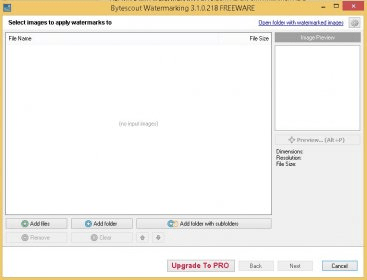
Bytescout Watermarking is a graphics design utility for Windows. This application allows you to add watermarks to all your pictures, for several purposes. A watermark is an image that goes on top of your pictures and its sole purpose is to protect them and so nobody else takes credit for your hard-work. Also you can add other types of watermarks. You can add any kind of text that you want to your pictures. Some people use watermarks for identifying where a picture was taken, or to add a time stamp to them. You can insert any type of comments. Bytescout Watermarking also allows you to add vertical text watermarks. The application is fairly easy to use. All you need to do is open the picture you want to add a watermark to and import the watermark. Then, after you configure some options, like the transparency of the watermark, the position, etc., you can process your picture. The application supports batch-mode processing, so you can simply load a picture folder and process all your pictures at the same time.
Advantages
  • Easy to use.
  • Support for vertical watermarks.
  • Supports text and images.
Disadvantages
  • The GUI could be simpler and more to the point.

Reviewed by: José Fernández

Reviewer rating: Editor's rating 4

Screenshots

Main Window Main Window Main Main Sample Sample Output Output

Latest comments


There are no comments, be the first one!
Add new comment
Tag cloud
Download siClient

Email Address:

Password:

Register now »

Forgot password?

Copyright © 2009, Informer Technologies, Inc. About| Privacy and terms| Help| Feedback